

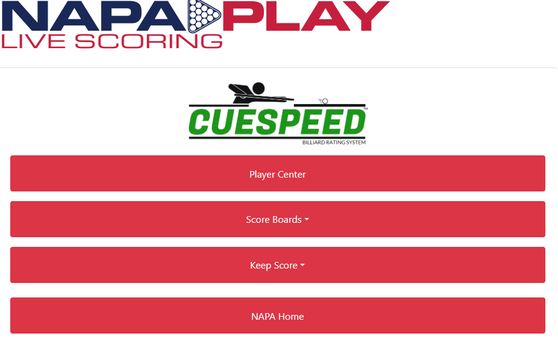
NAPA Play Live Scoring
NAPAPlay.com User Guide
Important: www.napaplay.com is a website, not an app.
Main Features
Player Center
A central hub where you can access:
-
NAPA Rules
-
NAPA Race Calculator
-
Weekly Scratch Sheets
-
Competition Sheets, Schedule, and more
Access Requirements:
-
Division ID
-
Any Player ID within the division
-
Specify if you are viewing information from a previous week
Score Boards
View live scores from your league matches as they are being played.
Access Requirements:
-
Division ID only
Additional options:
-
View any live tournaments hosted by NAPA (requires Tournament ID).
Keep Score
Used to record match scores. Only one team may keep score; the other team can follow results on the Score Board.
Steps:
-
Select the correct league type:
-
Singles
-
Team
-
Scotch Doubles
-
Scotch Triples
-
-
Enter Division ID and Captain ID.
-
Indicate whether this is a makeup match:
-
If “No,” sign in normally.
-
If “Yes,” select the week being made up, then sign in.
-
NAPA Home
Clicking this link will take you to the NAPA Leagues Home Page.
How to Keep Score
-
Click Keep Score.
-
Enter Division ID and one Captain ID.
-
If a makeup match: select Yes and choose the original match date.
-
Click Sign In.
From this screen, you can:
-
Set up matches
-
Record scores
-
Add players
Entering a Matchup
-
Click Enter a Matchup.
-
Select the winner of the lag.
-
Select the opponent.
-
If a forfeit, choose “Forfeit” at the bottom of the list.
-
In Scotch Doubles, select “FF” and assign all games to the opponent.
-
-
Choose the game (if Lagger’s Choice is being used).
-
Click Submit.
Scoring Notes:
-
A real-time score sheet appears with skill levels and race grids automatically calculated.
-
Mark the winner of each game as it is played.
-
Totals update automatically.
-
Bonus points (8 on the break, break-and-run, rackless) can be recorded via dropdown menus.
-
When finished, click Finished.
Matches can be run on two tables simultaneously by entering a second matchup.
Correcting Mistakes
-
Before clicking “Finished”:
-
Use the [X] next to the match on the left to delete it, then re-enter correctly.
-
If only one game result is incorrect, simply update it.
-
-
After clicking “Finished”:
-
Use the [E] (Edit) option on the left side of the match to adjust or delete the match.
-
Adding a Player
-
Go to Keep Score, enter your info, and sign in.
-
Click Add Player to Roster.
-
Choose one of the following:
-
Existing Player: Select from the dropdown list.
-
Viewing Other Matches
-
Click Score Boards
-
Enter Division ID
-
To view previous weeks:
-
Select Yes in the “Previous Week?” box
-
Choose the week you wish to view
-
-
Click Sign In
Player Center Tools
-
Competition Sheet: Skill levels, race matrix, and match details
-
Weekly Scratch: Results from last week, this week’s matches, and upcoming matches
-
Schedule: Week-by-week schedule of matches and venues
-
Race Matrix: Enter skill levels of two players to calculate race
-
Rules: Official NAPA rules for all formats
Contacting NAPA
For questions or issues:
-
Visit www.napaleagues.com
- Scroll down to Contact HQ
-
Submit your message through the contact form
Important: Keep your message professional and respectful. Present only the facts or your question.
Finishing Up
-
After all matches have been submitted, click Logout.
-
Standings, skill levels, and statistics are typically updated by 9:00 AM the next morning.
-
Electronic scoring is supported for makeup matches (Singles and Scotch Doubles only).